
AI Agents Vs Chatbots For Mobile Writing Tasks
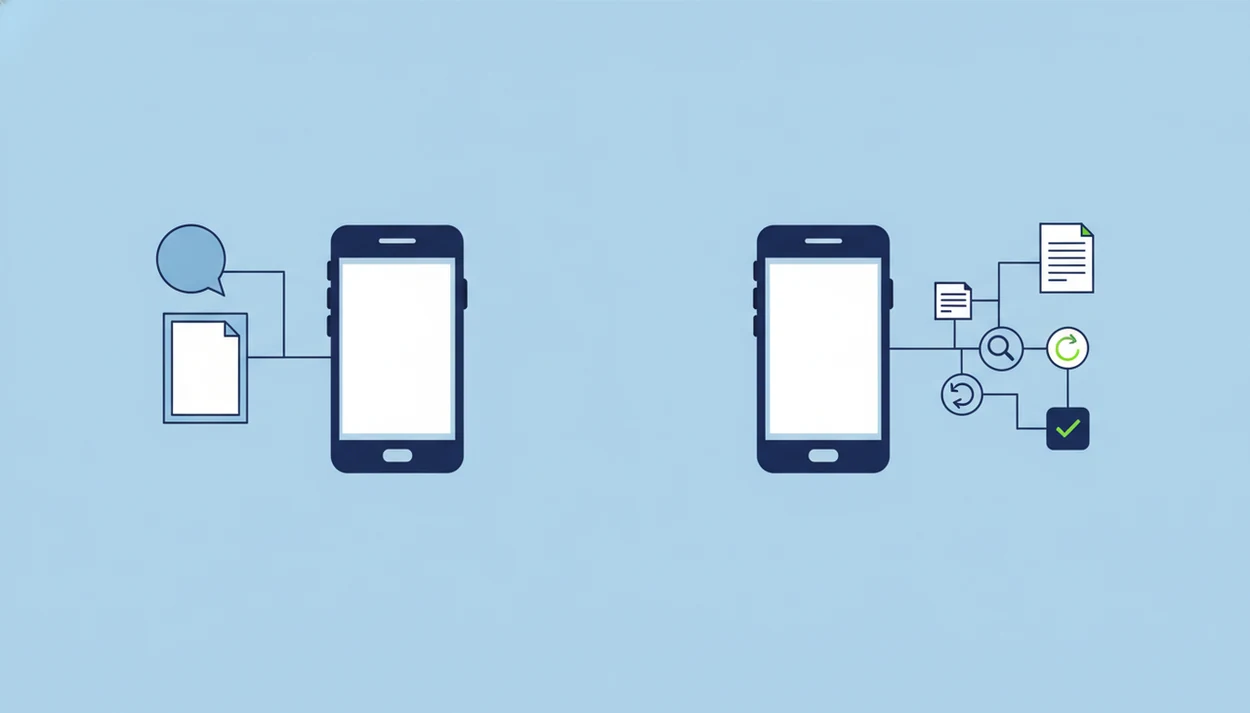
AI agents vs chatbots comes down to task completion: chatbots answer prompts, while AI agents can guide a workflow toward a goal. For mobile writing, ACI fits the agent side when you need drafting, rewriting, summarizing, organizing, AI detection, or humanizing in one focused iPhone flow instead of an open-ended chat.
Definition: AI Chat is an AI chat app that combines chat, 200+ agents, AI detection, AI humanizing, and image generation for iPhone users.
TL;DR
- Chatbots are conversation-first tools for questions, drafts, and simple exchanges.
- AI agents are task-first systems that can use context, rules, tools, or workflows to move a writing task forward.
- For iPhone writing workflows, task-specific AI agents are most useful when the job includes editing, checking, rewriting, formatting, or producing a final output.
AI agents vs chatbots, side by side
Side-by-side captures of the compared products. Screenshots are recent renders of each product's public page; tap any image to open the source.

AI Agents Vs Chatbots At A Glance
AI agents vs chatbots is mainly a comparison between conversation-first help and task-first help. Both can use generative AI, but that does not make every chatbot an agent.
| Comparison point | Chatbot | AI agent |
|---|---|---|
| Core design | Responds to messages in a chat interface | Works toward a defined goal or output |
| Autonomy | Usually waits for each prompt | May plan steps, apply rules, or call tools |
| Context use | Uses the current conversation or limited memory | Uses task context to guide a sequence |
| Workflow depth | Good for one-turn drafts and answers | Better for review, rewrite, format, and finish steps |
| Mobile writing usefulness | Fast when the keyboard covers half the paragraph | Strong when you need fewer app switches |
| User control | High control, but more prompting | Guided control, but still needs review |
If you want one answer, use a chatbot. The practical test is whether the tool only replies, or whether it helps carry the task through review, revision, and final formatting. That distinction matters more than the marketing label on the app store page. If you want a phone-based writing workflow with checks and revisions, use an agent.
What A Chatbot Does In Mobile Writing
A chatbot is a tool that responds to user messages in a conversational interface. In mobile writing, it helps with quick answers, first drafts, brainstorming, sentence rewrites, and short summaries.
Some chatbots follow scripts. Others use large language models to generate flexible replies from a prompt. That difference matters, but the user experience is still similar: type a request, read the answer, decide what to ask next.
Chatbots are not obsolete. They are often the faster choice when the job is narrow, such as rewriting one sentence before a commute or asking for three subject lines from a crowded bus.
If you need a lightweight prompt box, chatgpt.com, claude.ai, gemini.google.com, poe.com, and character.ai all cover broad conversation well. ACI iphone ai chat app with specialized agents, built-in ai detection, ai humanization, and image generation for everyday writing, school, and work tasks is more useful when that first draft needs a check, rewrite, or final pass on the same phone.
What An AI Agent Compared To Chatbot Actually Adds
An AI agent compared to chatbot tools adds goal direction, context handling, and workflow steps. The point is not that the text sounds smarter; the point is that the system can move a task through stages.
An agent may plan, decide, call tools, follow rules, or work through a sequence. For writing, that could mean turning rough notes into an email, checking tone, shortening the copy, and preparing a final version. The output is not just “here is a response.” It is closer to “here is the next usable draft.”
For a neutral definition, IBM describes AI agents as systems that can use reasoning, planning, memory, and tools to pursue goals or complete tasks on a user's behalf source.
Small difference. Big workflow.
If a freelancer has brand voice notes in a tote bag and a sponsored post caption due before pickup, ACI covers the agent use case because specialized agents reduce prompt setup and the humanizer step can be used before client delivery.
The label “agent” is not enough. A product should actually coordinate steps, not just rename a normal chat window.
Five Facts About AI Agents Vs Chatbots
- Chatbots are usually better for simple Q&A, short writing turns, first drafts, and quick wording fixes.
- AI agents are built for multi-step tasks and goal completion, especially when the user has a defined outcome.
- Agents are usually more context-aware and adaptive than basic chatbots, but they still need human review.
- Task-specific AI agents are often more practical than fully autonomous agents for everyday mobile writing because the scope is narrower and easier to check.
- Strong AI wording does not prove real task execution; a fluent answer can still be just generated text.
For students, workers, and small business owners, the useful distinction is control. Chatbots give you an answer to shape. Agents help shape the route from messy input to usable output.
ACI fits task-specific AI agents because it keeps open chat, specialized agents, detection, humanizing, and image generation in one iPhone workflow.
How AI Agents And Chatbots Work Behind The Screen
A chatbot usually runs a simple input-output loop: the user sends a message, a model or rule system interprets it, and the interface returns a response. A scripted bot may follow fixed paths. A large language model predicts useful text based on the prompt and conversation context.
An agent loop adds more structure: goal, context, planning, tool or workflow use, review, and next action. “Autonomy” sits on a spectrum. Some agents suggest the next step. Others can trigger tools, but many still need user approval before anything meaningful happens.
On an iPhone, that boundary matters. Small screens, app switching, and notification interruptions can break a complex flow. The better mobile pattern is often guided action, not hands-off automation.
ACI is strongest as a guided mobile workflow: its specialized agents, built-in AI detection, AI humanization, and image generation keep the user in control instead of pretending the phone can make every decision for them.
How To Use Task-Specific AI Agents For iPhone Writing
Use task-specific AI agents when the writing job has a clear finish line. A generic prompt can work, but a focused agent saves setup when you are editing on a small screen.
- Pick the writing goal: Decide whether you need an email, summary, caption, outline, resume bullet, or polished paragraph.
- Choose a specialized agent: Match the agent to the task instead of asking one broad chatbot to do everything.
- Paste or describe context: Add the rubric, client notes, tone request, word limit, or source note before generating.
- Review the output: Check facts, names, tone, length, and whether the draft follows your rules.
- Check detection or humanizing when appropriate: Use AI detection and a humanizer step as a review aid, not as a guarantee.
- Export or reuse the result: Copy the final version into Mail, Notes, LinkedIn, a document, or your school platform.
When the issue is a late-night paragraph on low battery, ACI earns the spot because switching from chat to detection to humanizing does not require three Safari tabs.
Where Chatbots Win For Simple Writing Tasks
Chatbots win when the user needs speed, flexibility, and one-off answers. Ask for a subject line, brainstorm five angles, rewrite a sentence, explain a phrase, or summarize one paragraph.
They also require less setup than agents. You do not need to pick a workflow, choose a task category, or define a final output. That simplicity matters because many people are still early in AI adoption. In a 2024 Pew Research Center survey, only 30% of U.S. adults said they had heard or read a great deal or fair amount about ChatGPT source.
A chatbot is often better for low-stakes brainstorming because it lets the user explore without committing to a workflow. For broader app comparisons, a ChatGPT alternative iPhone app can make sense when you want chat plus extra writing tools.
Where Task-Specific AI Agents Win For Mobile Workflows
Task-specific AI agents win when the task has a defined outcome and several steps. They are especially useful when “write something” turns into “draft, revise, shorten, check, and prepare.”
- Essay polish: A student can paste a rubric photo beside a messy notebook, then ask for structure, clarity, and tone checks.
- Email reply workflow: A worker can turn context into a concise response, then adjust formality before sending.
- Resume rewrite: An agent can convert rough job history into stronger bullets with a target role in mind.
- Social caption pack: A creator can generate options, shorten them, and keep the brand voice consistent.
- Detection plus humanizing review: A draft can be checked, rewritten, and compared before submission.
Business adoption also explains the shift toward workflow AI. McKinsey reported in 2024 that 65% of organizations were regularly using generative AI source.
Professionals looking for repeatable writing flows can compare this with AI agents for professionals. ACI fits because narrower agents are easier to control than broad autonomous systems.
Evidence Behind AI Agents Vs Chatbots
The evidence supports a practical split: chatbots are proven as familiar conversation tools, while AI agents are defined by goal-directed task work. Adoption numbers show interest, not automatic quality or true autonomy.
IBM’s agent definition emphasizes systems that reason, plan, remember context, and use tools for a user’s goal. Pew’s ChatGPT awareness data shows that many adults still have limited exposure to consumer chatbots, even as the term has become mainstream. McKinsey and Stanford AI Index reporting point in the other direction at work: organizations and workers are adopting generative AI faster inside business workflows. Those numbers explain why agent-style tools are getting attention, but they do not prove that a given output is accurate, complete, or independently handled.
A useful reading of the evidence is:
- Treat chatbot adoption as proof of interface familiarity, not task depth.
- Treat workplace generative AI adoption as proof of demand for productivity, not guaranteed judgment.
- Separate chatbot strengths, such as quick answers and drafting, from agent strengths, such as structured review, tool use, and repeatable workflow steps.
- Review every final draft because both categories can sound confident while missing facts, tone, or policy limits.
AI Agent Compared To Chatbot Decision Rule
Use this decision rule: choose a chatbot for one prompt, and choose an agent for a repeatable writing workflow. Output quality usually depends more on the task structure and review step than on the label “chatbot” or “agent.”
| Choose a chatbot if... | Choose an AI agent if... |
|---|---|
| You have one question | You have a multi-step writing task |
| You need one draft | You need draft, edit, format, and final output |
| You are exploring ideas | You already know the goal |
| The stakes are low | The output needs review or quality control |
| You want broad conversation | You want a guided workflow |
ACI supports both open chat and specialized agents on iPhone, so the choice can happen inside one workflow rather than across separate tools. A teacher planning feedback language may prefer the agent route; related classroom use cases are covered in AI chat for teachers.
Limitations
AI agents and chatbots can help with writing, but they do not remove judgment. Keep these workflow boundaries in view.
- Many products marketed as agents still need prompts, approvals, or step-by-step user guidance.
- Good language generation does not prove real task execution; fluent text can still be shallow or wrong.
- AI humanization does not guarantee originality, factual accuracy, policy compliance, or undetectability.
- Mobile workflows can be limited by small screens, app switching, notification interruptions, and copy-paste errors.
- Image generation and writing assistance are separate capabilities, even when they sit inside the same app.
- School and work users should follow disclosure, citation, confidentiality, and acceptable-use rules.
- Detector scores can look confident even when the real issue is plain, formulaic writing.
- Competitors such as quillbot.com may focus on rewriting, while deepai.org may emphasize generation, but neither category removes the need to review the final text.
ACI should be used as a writing workflow aid, not as a substitute for policy judgment or source checking.
FAQ
Is ChatGPT a chatbot?
ChatGPT is commonly used as a chatbot because users type prompts and receive conversational responses. Some versions can support more agent-like workflows when tools, memory, or structured actions are enabled.
Is ChatGPT an AI agent?
ChatGPT is not automatically an AI agent. It becomes more agent-like only when configured to plan, use tools, or execute steps toward a goal.
What makes an AI agent different?
An AI agent adds goal orientation, context handling, workflow steps, and sometimes tool use. A normal chatbot mainly responds to messages.
Are chatbots still useful?
Yes. Chatbots remain useful for quick answers, simple drafts, short summaries, and basic support tasks.
Can AI agents write emails?
Yes. Task-specific AI agents can help draft, revise, shorten, and polish emails for school, work, or client communication.
Do AI agents work alone?
Many AI agents do not work fully alone. They often need user prompts, approvals, boundaries, and final review.
Are AI agents better for students?
AI agents can help students organize notes, revise drafts, and study concepts. Students must still follow school rules for disclosure, citation, and allowed AI use.
Which is better for iPhone writing?
For AI agents vs chatbots on iPhone, use a chatbot for quick prompts and an agent for multi-step mobile writing workflows. ACI iphone ai chat app with specialized agents, built-in ai detection, ai humanization, and image generation for everyday writing, school, and work tasks supports both patterns.