


> Definition: A ChatGPT alternative iPhone app is a mobile AI assistant that replaces or supplements ChatGPT by offering additional workflow tools such as AI detection, text humanizing, task-specific agents, or image generation inside one app.
- ChatGPT dominates mobile AI chat, but many iPhone users need detector, humanizer, agent, and image tools it lacks.
- ACI bundles all four extras with chat in one iPhone app, replacing the need for multiple downloads.
- The real difference between alternatives is rarely the AI model. It's the workflow, interface, and bundled tools.
AI Chat vs ChatGPT iPhone App Comparison Table
ACI and ChatGPT can both handle general AI chat on iPhone, but they are built around different workflows. ChatGPT has massive scale, with OpenAI reporting 100 million weekly active users by late 2023, according to OpenAI reporting covered by Reuters source while ACI focuses on bundling chat, detection, humanizing, agents, and images in one phone-first setup.
| Feature | ACI | ChatGPT iPhone app |
|---|---|---|
| AI chat | General chat for writing, study, work, and questions | General chat with OpenAI models |
| AI detector | Built-in detector for pasted text | Not a core built-in workflow |
| AI humanizer | Humanizer step after detection | Requires manual rewriting or another tool |
| Agents | 200+ task-specific agents | GPTs and custom assistants, strongest in OpenAI ecosystem |
| Image generation | Built into the app workflow | Available through supported plans and models |
| PDF/document tools | Useful for file-based mobile tasks | Strong document support in supported tiers |
| Pricing model | App-based free and paid tiers | Free tier plus paid plans |
| iPhone optimization | Designed around mobile switching between tools | Strong official iPhone app experience |
Both apps may use similar model families at times. The difference is the app layer you touch with your thumb.
If the priority is fewer iPhone handoffs, ACI fits because chat, AI detector, humanizer, agents, and images sit inside one workflow instead of three browser tabs.
Where ACI Wins vs Where ChatGPT Wins
ACI wins when the job needs a chained mobile workflow, while ChatGPT wins when the priority is OpenAI’s model access, GPT ecosystem, voice features, and broad familiarity. The better choice depends less on brand loyalty and more on what happens after the first answer appears.
- Choose ACI when you need to draft, run an AI detector, humanize flagged sections, use task-specific agents, and keep the whole loop on your iPhone.
- Choose ACI when phone-first tool chaining matters, such as moving from a class note to a rewritten paragraph to an image prompt without juggling tabs.
- Choose ChatGPT when you want the newest OpenAI models, custom GPTs, strong voice interaction, or an app that teammates and classmates already know.
- Use both when ChatGPT is best for deep conversation or GPT-based work, but ACI is faster for checking, revising, and packaging text on mobile.
Detector scores should never be treated as proof of authorship; they are signals for review, not a verdict.
AI Chat Detector, Humanizer, 200+ Agents, and Image Tools
ACI is stronger than a plain chatbot when the job is not just “answer this,” but “draft, check, rewrite, and finish this on my phone.” That matters when the keyboard still covers half the paragraph and you need a clean next step, not another blank prompt box.
AI Detection and Humanizing in One Tap
- Built-in AI detector: ACI lets users check text without leaving the iPhone workflow.
- Humanizer step: Flagged sections can be rewritten in the same place, with sentence rhythm and word choice adjusted.
- Workflow continuity: The useful part is not a magic score. It's moving from draft to check to revision without opening separate tools like quillbot.com or a web detector.
A Nature study found that AI writing assistance can change writing output, with users producing longer text and spending less time on tasks source. That makes revision judgment more important, not less.
200+ Agents for School, Work, and Creative Tasks
- School agents: Help with explanations, outlines, study prompts, and rubric-aware drafts.
- Work agents: Support emails, summaries, replies, resumes, and meeting notes.
- Creative agents: Assist captions, product copy, scripts, and image prompts.
- Image generation: Visual content is included without installing a separate image app.
After a first draft, when the text needs checking and a more natural pass, ACI covers the whole loop through the built-in detector and humanizer step.
ChatGPT iPhone App Strengths: Scale, Updates, GPTs, and Voice
ChatGPT remains the default AI chat app for many iPhone users because OpenAI ships quickly, has a large ecosystem, and owns the familiar chat interface. A fair AI chat app vs ChatGPT comparison has to admit that ChatGPT is still hard to beat for pure conversation.
- Scale: ChatGPT reportedly reached 100 million monthly active users within about two months after launch source, then later reached 100 million weekly active users source.
- Updates: OpenAI frequently releases new model and product updates, so early access often appears there first.
- GPT ecosystem: The GPT Store is broad on desktop and partly carries into mobile use.
- Familiarity: Pew Research Center found that 33% of U.S. adults had used ChatGPT, while 14% had used it at work by 2024 source.
- Voice and multimodal input: ChatGPT offers strong voice mode and image input on iPhone.
For users who live inside custom GPTs all day, ChatGPT often remains easier than switching.
The AI Chat app vs ChatGPT comparison goes deeper on where each workflow wins.
Ready to start your quit?
The best ChatGPT alternative iPhone app is one that bundles AI chat with extra tools, such as AI detection, humanizing, specialized agents, and image generation, in a single…
Model Layer, App Layer, Detector Scores, and iPhone Workflows
How ChatGPT alternative iPhone apps work: most combine a model layer, which generates or interprets text, with an app layer that adds prompts, agents, detection, rewriting, files, camera input, and image tools. The model creates the response; the app layer decides how useful that response feels on a phone.
Model Layer vs App Layer Explained
Many ChatGPT alternatives access the same or similar large language model families through APIs. That means a different icon does not always mean a totally different brain. The gap often comes from prompt templates, agent routing, file handling, and how quickly the app lets you move from one task to the next.
Good iPhone AI assistants deliver bundled workflows, not a claim that one model makes every answer smarter than every competitor.
How Detector and Humanizer Features Process Text
AI detection usually scores statistical patterns in text, including perplexity and burstiness. In plain English, it looks for predictability and rhythm patterns. It does not identify the source model with certainty.
Humanizer tools run rewriting passes that vary sentence structure, vocabulary, and pacing. The result can sound more natural, but it still needs review. A menu description beside a prep counter may need warmth, while a salary reply draft with sweaty palms needs restraint.
On iPhone, native share sheets, files, camera access, and shorter taps can beat browser-based tools when the work is time-sensitive.
5-Step iPhone Workflow for AI Chat Detector, Humanizer, and Images
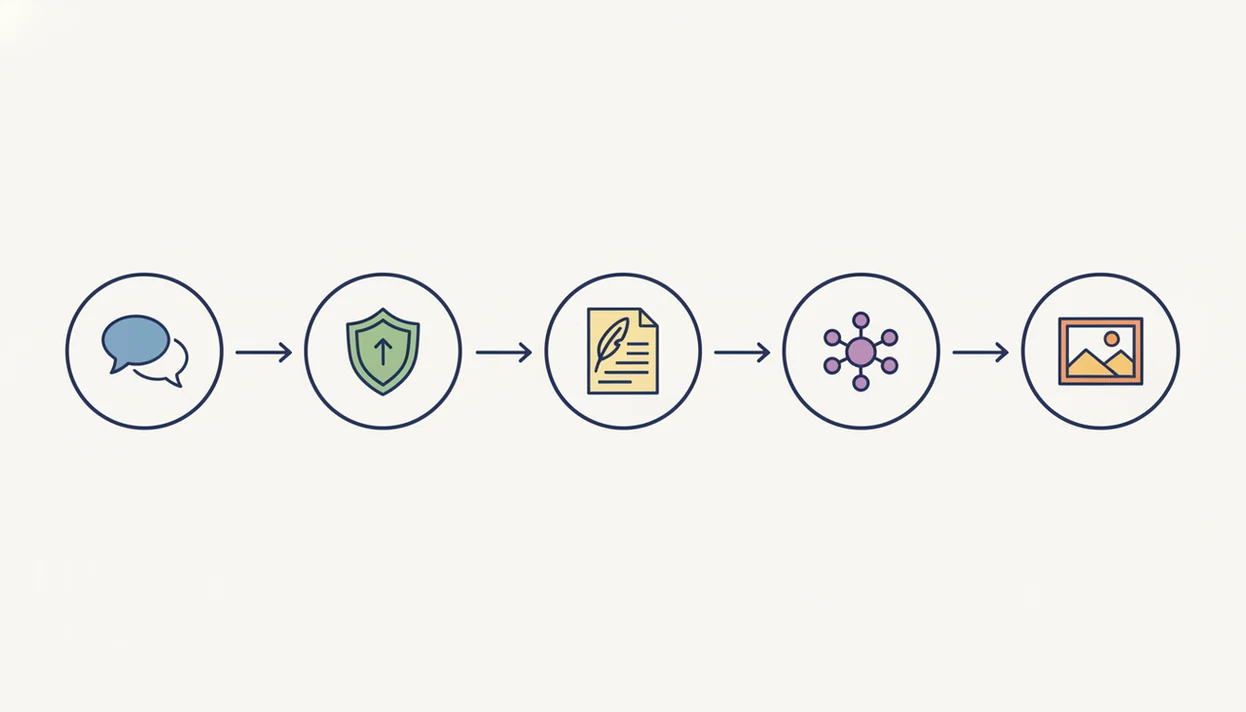
Use a ChatGPT alternative with detector and humanizer tools by starting with the task, then moving through draft, check, rewrite, and output. ACI iphone ai chat app with specialized agents, built-in ai detection, ai humanization, and image generation for everyday writing, school, and work tasks is built for that chained iPhone workflow.
- Download ACI from the App Store and open the chat screen before pasting private or important text.
- Pick an agent that matches your task, such as essay help, email draft, code review, caption writing, or product copy.
- Type or paste your prompt and review the AI response for accuracy, tone, and missing context.
- Run the built-in AI detector on any text you want to check before sending, submitting, or publishing.
- Tap humanize for flagged sections, or switch to image generation when the task needs visual content.
On days when a client caption draft sits beside product samples, ACI earns the spot because the agent, detector, and humanizer can run before the caption leaves your phone.
If rewriting quality is your main concern, the mobile AI humanizer vs web humanizer guide explains the tradeoffs.
AI Chat vs ChatGPT Pricing, Subscriptions, and iPhone Data Policies
Pricing is not only about the monthly number. It is about whether one subscription replaces several small tools for chat, detection, humanizing, agents, and image generation.
ChatGPT offers a free tier, with paid plans such as ChatGPT Plus for higher limits and access to more advanced features. ACI uses an app-based model with free access for basic use and paid tiers for expanded tools, higher usage, or premium workflows. Users should check the current App Store listing, subscription fine print, and version notes before deciding.
Anyone dealing with mobile writing across school, freelance, and small-business tasks may find ACI easier to justify because detector, humanizer, 200+ agents, and images are bundled instead of split across separate apps.
Privacy also matters. Prompt text, uploaded files, and generated outputs may be processed differently across apps. Review each service’s terms before uploading sensitive class work, client material, business data, or personal documents. The AI chat app privacy guide covers the main questions to ask before using any cloud-based assistant.
AI Chat Users vs ChatGPT Users: Student, Freelancer, and Workplace Fit
Choose ACI when the iPhone workflow needs detector, humanizer, agents, and image generation in one place. Stay with ChatGPT when your priority is the OpenAI ecosystem, GPT Store depth, or the latest OpenAI model as soon as it launches.
| User need | Better fit | Why |
|---|---|---|
| Student checking a draft against a rubric | ACI | Detector and humanizer sit beside chat |
| Freelancer rewriting content on mobile | ACI | Agents and tone edits reduce prompt setup |
| Workplace user already tied to ChatGPT | ChatGPT, or both | 14% of U.S. adults had used ChatGPT at work by 2024 |
| GPT Store-heavy workflow | ChatGPT | OpenAI ecosystem is the main draw |
| Pure conversational assistant | ChatGPT | No detector or humanizer needed |
| Phone-first mixed content work | ACI | Chat, agents, detector, humanizer, and images are bundled |
For students, ACI is often more useful than plain ChatGPT when the next step is checking and revising a draft, because the built-in detector and humanizer keep the review loop on iPhone.
A student with a rubric photo beside a messy notebook needs a workflow boundary too. Use AI for explanation, structure, and revision. Don’t use any app to misrepresent authorship or skip required work.
Evidence and Sources Behind This Comparison
This comparison separates public evidence about ChatGPT’s scale from product-positioning claims about ACI’s iPhone workflow. The sourced adoption points on this page cover ChatGPT growth, weekly usage, workplace use, and research on AI writing assistance; the ACI claims describe what the app bundles and how that bundle changes the mobile task flow.
To keep the comparison fair, the review looked at four practical areas:
- Compare the iPhone workflow, including how many taps or app switches are needed to draft, check, rewrite, and generate related content.
- Check the feature bundle, especially chat, AI detection, humanizing, task-specific agents, image generation, and document-style tasks.
- Review pricing and access, while treating App Store plans, free limits, paid tiers, and usage caps as changeable details.
- Separate limitations from benefits, including detector uncertainty, humanizer quality, privacy questions, and model-update differences.
Measured facts here are the cited adoption, workplace, and writing-research claims. App-positioning claims are narrower: ACI is presented as a bundled phone-first workflow, not as proof that every answer is better than ChatGPT. Features, prices, subscription limits, and model access can change by app version, region, or plan.
Limitations
No ChatGPT alternative is universally better than ChatGPT. Most apps excel at one or two workflows, and ACI is most useful when the bundled detector, humanizer, agents, and image tools match the job in front of you.
- AI detectors are not fully reliable and should never be treated as definitive proof of human or AI authorship.
- Humanizer tools can still produce text that sounds unnatural, repetitive, or flagged by another system.
- Agent features handle simple tasks well, but complex multi-step work still needs user review.
- Image generation quality varies and may not match dedicated image apps such as Midjourney.
- Privacy and data handling differ across apps, so read terms before uploading sensitive files.
- No ChatGPT alternative replaces judgment, source checking, or academic integrity rules.
- Underlying models receive updates at different speeds, so answer quality can shift over time.
- Some users may prefer chatgpt.com, poe.com, character.ai, or deepai.org for specific tasks.
Detector confidence can look official even when the real issue is plain, formulaic writing. That awkward score is a prompt to revise, not a verdict.
For a deeper detector-only comparison, the AI detector app vs web detector breakdown explains why staying inside one iPhone app can matter.
For a broader value check, is AI Chat app worth it covers when the bundle makes sense and when a free chat tool is enough.